Clans and Alliances |
|||||||||||||||||||||||||||||||||||||||||||||||||||||||||||||||||||||||||||||||||||||||||||||||||||||||||||||||||||||||||||
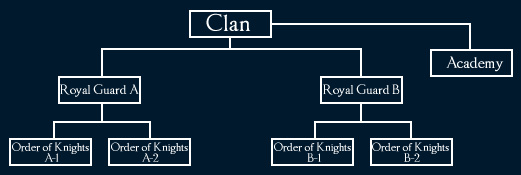
[ Clan Organization | Upgrading Clan Levels | Royal Guards and Order of Knights | Reputation Points | Clan Skills | Clan Academy | Clan Rights and Delegation | Other Changes ] The maximum clan level has been increased from level 5 to level 8. When the clan level is 5 and above, additional members may be added by creating an Academy, Royal Guard, and Order of Knights. The organizational structure of the clan and number of clan members are as follows:
|
|||||||||||||||||||||||||||||||||||||||||||||||||||||||||||||||||||||||||||||||||||||||||||||||||||||||||||||||||||||||||||
The maximum number of members within an Academy is 20. The maximum number of members in a Royal Guard is 20, and up to a total of 2 Royal Guard units may be created. The maximum number of members in an Order of Knights is 10, and up to 4 Orders of Knights may be created. The requirements for upgrading the clan level are as follows:
Royal Guards and Order of Knights When a clan leader upgrades the clan’s level by consuming the clan’s reputation score, the leader may create sub-units called Royal Guards and Orders of Knights. Requirements for Creating a Royal Guard When a clan reaches level 6, a Royal Guard may be created. Upon creation of a Royal Guard, one of the clan members must be appointed an administrator. Up to 2 Royal Guards may be created. The maximum number of members in a Royal Guard is 20. Requirements for Creating an Order of Knights When a clan reaches level 7, an Order of Knights may be created. Upon creation of an Order of Knights, one of the clan members must be appointed as an administrator. Up to 2 Orders of Knights may be created under one Royal Guard. The maximum number of members in an Order of Knights is 10. Disbandment Once created, Royal Guards and Orders of Knights cannot be dissolved unless the clan is dissolved. When the administrator of each unit withdraws from their clan, the unit remains, and the administrator position becomes vacant. In this case, the clan leader must appoint a new administrator. The reappointment of the unit administrator can be done through an NPC that is in charge of clan-related activities. Organizational Structure The organizational structure of the units are as follows:
Rights Within the Clan
Sub-units can participate in a clan war and siege war under the same conditions as the clan. Which organizations you can invite a new clan member to join is determined by what organization you belong to yourself. When inviting someone, you can now see only those organizations to which you can invite someone. For example, Royal Guard members cannot invite a new clan member as a direct clan member but can invite a new clan member only to Royal Guard/Order of Knights/Academy. When a clan reaches level 5 or more, the clan may accumulate clan reputation points which are earned through various clan activities. The world clan ranking based on the clan reputation score may be viewed in the Adventurer's Guide Book. The reputation score increases in the following cases:
The reputation score decreases in the following cases:
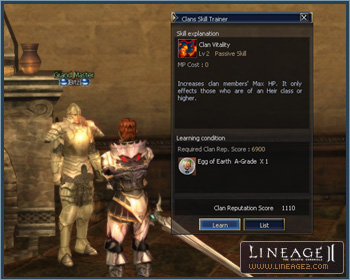
Clan members may purchase an A-grade Apella Armor Set with their clan reputation score. The related NPCs are located in the Town of Aden and Rune Township. New clan skills that can be applied to all clan members have been added.
Once a clan skill is mastered, it can be permanently used until the clan is dissolved. However, if the clan’s reputation score becomes 0 or below, the skill will no longer work until the reputation score returns to a positive number. When a clan member reaches a status whereas the clan skill can be applied, that clan skill is displayed in the player’s skill window and the skill’s effects are then usable. As the clan’s level increases, additional skills become available. In order to master a clan skill, a clan needs to accumulate special items related to raid bosses and have a sufficient reputation score. If a clan’s reputation score reaches -1 or below, it will be unable to learn clan skills, even ones that do not require a reputation score. The new clan skills are as follows:
An Academy system has been added in order to ease game play for new players in addition to creating a method for long-term clan expansion. Creation Requirements Clans level 5 and above may create an Academy. Conditions for Joining Any character, level 39 or below, who has not yet joined a clan and has not yet completed the second class transfer may join an Academy. The maximum number of members in an Academy is 20. How to Create an Academy The clan leader can create an Academy through NPCs who are in charge of clan-related activities (a High Priest, Grand Master, etc.). Benefits and Withdrawal of Academy Members When an Academy member completes his/her second class transfer, the member will receive a commemorative item. The Grand Master NPC of the member’s own class will award the commemorative item automatically upon the completion of the second class transfer. The member is then automatically withdrawn from the Academy, and will not receive a penalty for re-joining a clan. Academy Members’ Rights An Academy member’s clan name is the same as the main clan name, but is displayed in yellow. Academy members may use clan chat and alliance chat. By default, Academy members may use the clan hall and castle owned by the clan just like any other clan member. However, the clan leader does have the option to set it up so that Academy members may not use them. Academy members may use the clan warehouse and clan bulletin board just like any other clan member. However, the clan leader does have the option to set it up so that Academy members may not use them. The rights below cannot be bestowed upon Academy members:
When in a clan war or a siege with Academy members:
Sponsors Academy members who have a sponsor have their names displayed in yellow, but the names of those without sponsors are displayed in white. Clan members who have master management rights may appoint other clan members as sponsors for Academy members. Alert messages indicating their logged in status will be displayed for Academy members and their sponsors. The relationship between Academy members and their sponsors may only be one-on-one. Clan members who have master management rights may dissolve the relationship between an Academy member and their sponsor. Academy members can acquire a D-grade armor set through a quest that may be conducted with ordinary clan members. Only Academy members and graduates of an Academy may wear the armor set acquired through this quest. When withdrawing from an Academy, after acquiring the armor set, the armor will not be unequipped automatically. However, once you unequip the armor it cannot be worn again. Many different kinds of rights have been added and modified for clan leaders to bestow upon clan members. Clan leaders need to pay extra attention when they bestow these rights to their clan members especially when related to things such as clan reputation points, clan member joining/withdrawal, and rights related to the clan’s castle and manor. New rights include:
Modified rights include:
The clan leader may assign rights related to clan halls and castles even when the clan doesn’t own one at the time. The “Edit Privileges” function has been added for the assignment of simple rights. A clan leader may setup clan rights in advance and according to rank. To assign rights to clan members by rank:
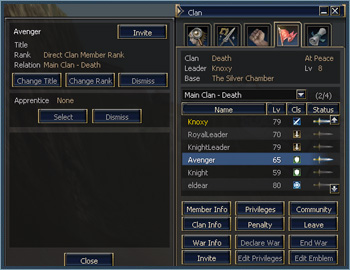
Clan Leadership Transfer A clan leader may transfer their rights to other clan members. The leader must request the clan leader transfer from an NPC who is in charge of clan activities. The new clan leader will assume their new role during the next regularly scheduled maintenance time (10:30 CDT on Tuesdays). (The clan leader transfer should still be completed even when the server is down unexpectedly.) A clan leader transfer may be cancelled anytime prior to the regular maintenance time. Clan Window Many different functions have been added for easier and more systematic clan-related activities and as such, the related interface has also been improved. Double click on a clan member’s name in the member list to open a menu window displaying the rights given to that member.
Selection tabs have been added to the clan window so that you may see the members of the main clan, Academy, Royal Guard, and Order of Knights. In order to invite somebody to join a clan, click the “Invite” button and select the organization within the clan you wish to invite the person to. When clicking the Edit Emblem button, the menu window where you may register or delete the clan emblem or clan insignias is displayed. An information window to view clan war information by status has been added as well as an Edit Privileges window. The maximum number of clans in an alliance is three. The penalty given upon dismissal or withdrawal from a clan has been shortened from 5 days to 1 day. Clan Hall Managers now show the amount that will be deducted from the clan warehouse and the date the transaction will occur. |
Clans and Alliances
chronicle5_02